OSPF configuration
Explanation
In this section we will link the individual LANS together by addressing the WAN and the core and configuring OSPF to enable end-to-end connectivity.
For a router to be able to forward a packet to a destination network, it must know where that network is. When you configure an IP on an Interface, the router knows that it is connected to that network and that packets destined for the network and be sent out of that interface. That’s why we can ping directly connected neighbours even without a routing protocol.
To learn about networks that a router is not connected to, a router can either be told by the administrator (static routes) or it can learn about distant networks via messages from its neighbour routers (dynamic routing protocol such as OSPF).
A key part of OSPF configuration is the enabling of OSPF on the interface and the positioning of the interface in an appropriate OSPF area. An end-to-end ping from a PC in Perth to a PC sydney, requires that every router (includes the distribution layer) have knowledge of both the source and destination network (ping sends packets to and from a destination).
To enable OSPF on an interface you must use the ip ospf {process ID} area {aread ID} command.
The hotel scenario requires Perth internal links to be in area 1, Sydney in area 2, and the core-to-core links to be in area 0, you will need to take care with your OSPF areas. Study the areas in the following diagram and notice that the areas are defined on an interface level not a router level. Often there is confusion in that Area 0 is seen as being the core routers rather than network between the core routers.
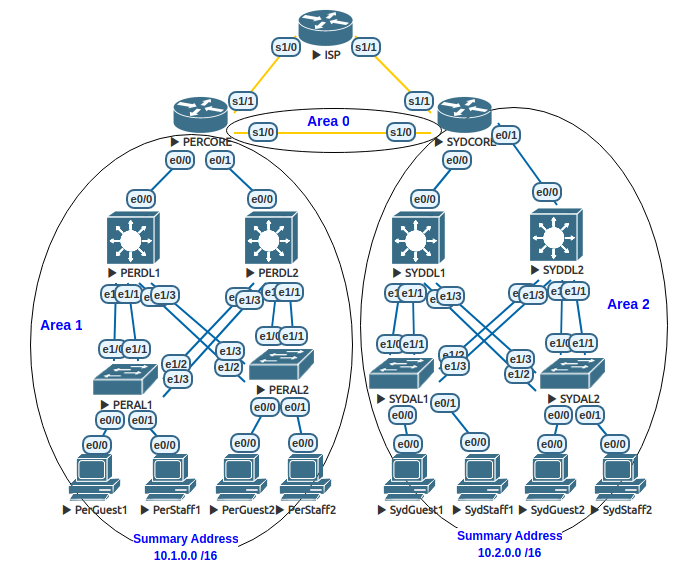
Core and WAN IP address configuration
Up to this point we have only addressed LAN devices and VLAN interfaces. To achieve enterprise wide connectivity we need to configure router IP addresses, including the WAN link (core-to-core).
What you need to do?
- Configure IP addresses router to router links. Refer to the IP addressing tables previously developed.
- The e0/0 interfaces on your DL routers will need to be turned into routed ports with the no switchport command. This will allow you to apply the IP address directly to the interface.
- Remember to configure the e0/0 and e0/1 interfaces on your Core routers.
- Configure IP addresses on your Core S1/0 interfaces.
How you will know it is configured correctly?
It is crucial that you ensure point-to-pont connectivity before moving on to the OSPF routing steps. Routing builds end-to-end connectivity by stringing together sequencecs of point-to-point link. You cannot have connectivity if any of the point-to-point links in the chain do not work.
- The show ip interface brief cpmmand can be used to double check your address configuration on the core and distribution devices.
- You should be able to ping your directly attacthed neighour interface.
OSPF routing throughout the hotel group
What you need to do?
- Configure OSPF on each of your routers.
- Include OSPF statements to put the interfaces in the correct OSPF area.
- The VLAN interfaces for the distribution layer devices are a crucial inclusion in OSPF. The represent the source/destination network for your PCs. So you need to include them in your OSPF configuration.
How you will know it is configured correctly?
- The show ip route command is your friend.
- You should see O Routes indicating routes the local router learned via OSPF.
- You should see IA Routes indicating the routes came from another area.
- You should see every IP network in the routing table of every router.
Here is an example:
PERCORE#show ip route
Codes: L - local, C - connected, S - static, R - RIP, M - mobile, B - BGP
       D - EIGRP, EX - EIGRP external, O - OSPF, IA - OSPF inter area
       N1 - OSPF NSSA external type 1, N2 - OSPF NSSA external type 2
       E1 - OSPF external type 1, E2 - OSPF external type 2
       i - IS-IS, su - IS-IS summary, L1 - IS-IS level-1, L2 - IS-IS level-2
       ia - IS-IS inter area, * - candidate default, U - per-user static route
       o - ODR, P - periodic downloaded static route, H - NHRP, l - LISP
       a - application route
       + - replicated route, % - next hop override

Gateway of last resort is not set

      10.0.0.0/8 is variably subnetted, 14 subnets, 3 masks
C        10.0.255.0/30 is directly connected, Serial1/0
L        10.0.255.1/32 is directly connected, Serial1/0
O        10.1.20.0/24 [110/11] via 10.1.255.5, 00:00:24, Ethernet0/1
                      [110/11] via 10.1.255.1, 00:00:24, Ethernet0/0
O        10.1.25.0/24 [110/11] via 10.1.255.5, 00:00:24, Ethernet0/1
                      [110/11] via 10.1.255.1, 00:00:24, Ethernet0/0
O        10.1.128.0/24 [110/11] via 10.1.255.5, 00:00:24, Ethernet0/1
                       [110/11] via 10.1.255.1, 00:00:24, Ethernet0/0
C        10.1.255.0/30 is directly connected, Ethernet0/0
L        10.1.255.2/32 is directly connected, Ethernet0/0
C        10.1.255.4/30 is directly connected, Ethernet0/1
L        10.1.255.6/32 is directly connected, Ethernet0/1
O IA     10.2.20.0/24 [110/75] via 10.0.255.2, 00:00:21, Serial1/0
O IA     10.2.25.0/24 [110/75] via 10.0.255.2, 00:00:21, Serial1/0
O IA     10.2.128.0/24 [110/75] via 10.0.255.2, 00:00:21, Serial1/0
O IA     10.2.255.0/30 [110/74] via 10.0.255.2, 00:00:24, Serial1/0
O IA     10.2.255.4/30 [110/74] via 10.0.255.2, 00:00:24, Serial1/0
- As you have routing configured, you should now be able to ping between any of the PC’s. If you can’t ping then it is almost certainly that somewhere in the chain of routers between the source and destination, at least one of them is missing the source or destination route. It could be an OSPF issue but OSPF relies on connectivity between the routers. So anything that breaks communication between routers will prevent end-to-end communications.
Troubleshooting end-to-end connectivity
- The basics
- Links are up and addressed properly - can ping neighbours including PCs.
- OSPF is configured correctly - Routing table is complete on every router in the path.
- PCs need to know how to get out of their subnet. Check the gateway (default route) on your PCs
- Find the boundary of the problem using traceroute. The command will provide you with IP address of each device your packet successfully arrives at. If your packet stops prematurely, you can localise the fault.
- Remember ping requires traffic to travel to the desitination and then return. The fault could be on the return path.
SydStaff2#traceroute 10.1.20.10
Type escape sequence to abort.
Tracing the route to 10.1.20.10
VRF info: (vrf in name/id, vrf out name/id)
  1  *
    10.2.128.2 3 msec 2 msec
  2 10.2.255.2 2 msec 2 msec 2 msec
  3 10.0.255.1 9 msec 11 msec 10 msec
  4 10.1.255.1 11 msec 11 msec 11 msec
  5  *
    10.1.20.10 13 msec 11 msec
SydStaff2#
What questions could I see on the practical exam?
- OSPF not configured.
- Incorrect or missing OSPF statement.
- Wrong area.
OSPF summarisation
In order to create a scalable routing table, we should summarise wherever possible. Referring to the diagram, configure appropriate address summarisation.
What you need to do?
- Configure address summarisation so that perth is represented by the 10.1.0.0/16 summary route in Sydney’s roputing table.
- Configure address summarisation so that Sydney is represented by the 10.2.0.0/16 summary route in Perth’s roputing table.
How you will know it is configured correctly?
- The routing table in each area should show detailed routes for only its area. A single /16 route should represent that other area.
PERDL1#sh ip route
Codes: L - local, C - connected, S - static, R - RIP, M - mobile, B - BGP
       D - EIGRP, EX - EIGRP external, O - OSPF, IA - OSPF inter area
       N1 - OSPF NSSA external type 1, N2 - OSPF NSSA external type 2
       E1 - OSPF external type 1, E2 - OSPF external type 2
       i - IS-IS, su - IS-IS summary, L1 - IS-IS level-1, L2 - IS-IS level-2
       ia - IS-IS inter area, * - candidate default, U - per-user static route
       o - ODR, P - periodic downloaded static route, H - NHRP, l - LISP
       a - application route
       + - replicated route, % - next hop override

Gateway of last resort is not set

      10.0.0.0/8 is variably subnetted, 11 subnets, 4 masks
O IA     10.0.255.0/30 [110/74] via 10.1.255.2, 00:47:02, Ethernet0/0
C        10.1.20.0/24 is directly connected, Vlan20
L        10.1.20.2/32 is directly connected, Vlan20
C        10.1.25.0/24 is directly connected, Vlan25
L        10.1.25.2/32 is directly connected, Vlan25
C        10.1.128.0/24 is directly connected, Vlan1000
L        10.1.128.2/32 is directly connected, Vlan1000
C        10.1.255.0/30 is directly connected, Ethernet0/0
L        10.1.255.1/32 is directly connected, Ethernet0/0
O        10.1.255.4/30 [110/11] via 10.1.128.3, 00:47:12, Vlan1000
                       [110/11] via 10.1.25.3, 00:47:12, Vlan25
                       [110/11] via 10.1.20.3, 00:47:12, Vlan20
O IA     10.2.0.0/16 [110/84] via 10.1.255.2, 00:04:27, Ethernet0/0
PERDL1#
What questions could I see on the practical exam?
- OSPF not summarised correctly.
- Fix it
- OSPF not summarised at all.
- Add summarisation